Create an AI Halloween photo from a selfie, couple portrait or pet picture. Explore cinematic character looks, compare real examples and prepare your own photos.
Your photos, reimagined Private by default No prompt writing needed
YOUR NEXT ALTER EGOPHOTO → PHOTO
01
Start with your photo
A clear, well-lit photo works best. Creative edits may change facial details.
02
Choose your transformation
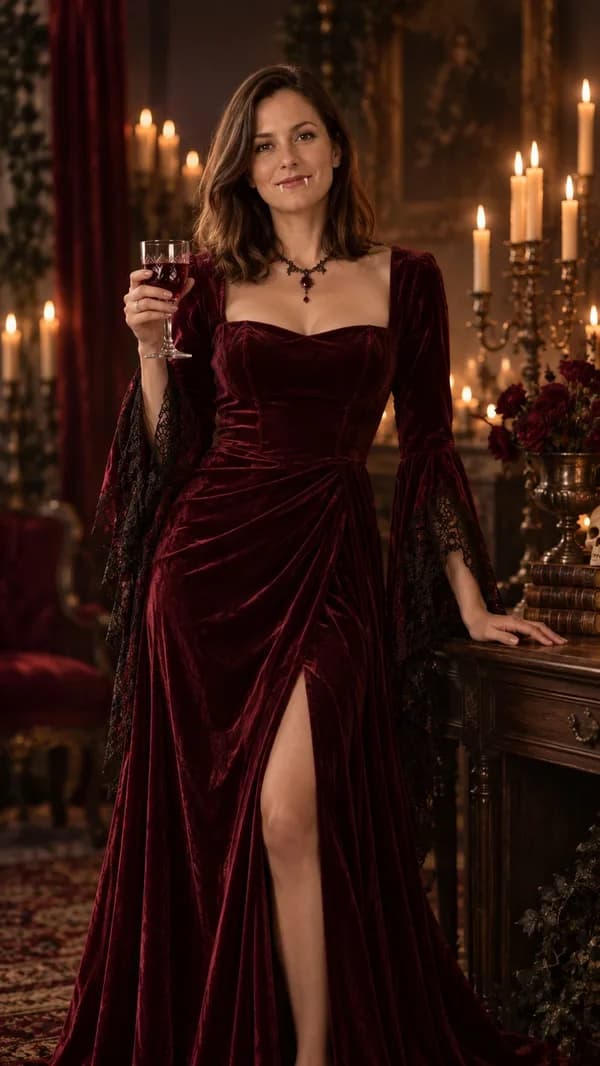
Elegant burgundy outfit, subtle fangs and candlelit gothic backdrop.
Explore the examples below, or join the waitlist for AI generation. Your uploaded photo stays in this browser until you submit a supported generation.
YOUR CREATION Private by default
REAL GENERATED EXAMPLE · Velvet vampire
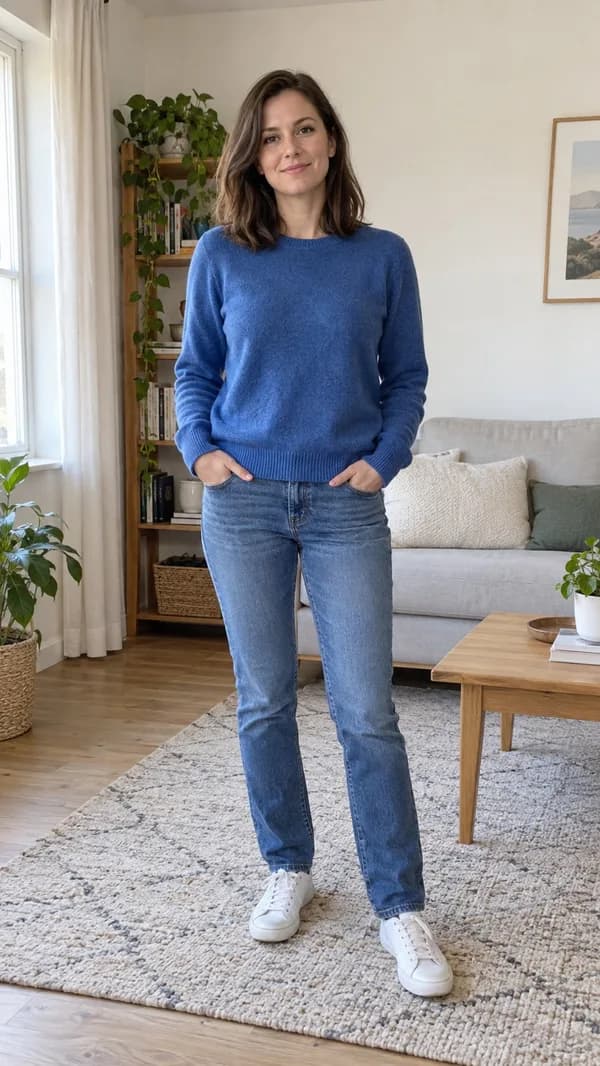
BeforeAI result
Fictional demonstration subject. Your private result will appear here.
FROM THE SAME PHOTO
See the actual edit
Actual model outputs from our tests. The source people and pets are fictional, AI-created demonstration subjects. Your results will vary.
BeforeAI result
Velvet vampire
Compare the original pose and facial features with the candlelit vampire portrait. The edit adds a burgundy velvet dress, theatrical fangs and a gothic room; look at the neckline and background as well as the face. Use a source with shoulders and torso visible when you want this much clothing detail.
PREPARE YOUR PHOTO
How to Turn Your Selfie Into a Halloween Character in 3 Steps
1. Choose a useful starting photograph
Choose a sharp selfie taken near a window or in soft daylight. Keep both eyes visible, remove face-obscuring stickers and use a photo without a strong beauty filter. Include your shoulders if you want a cape or a detailed neckline. A tight face crop leaves less space for the character styling and background that make a Halloween portrait readable.
2. Match the effect to your subject
Choose Photo for a new character portrait, Costume when the outfit matters most, or Filter for a lighter change to atmosphere. Set the subject mode before choosing an effect so the available looks suit a person, couple or pet. For a recognizable portrait, begin with a simple composition rather than asking the image to solve a crowded scene at the same time.
3. Inspect the result before sharing
Compare the source and result at a similar size. Look at the eyes, smile, hands and the number of subjects before deciding whether to keep it. Check the whole image, including background details and cropped edges. Download a completed private result within seven days. If you later choose Animate, review the still first: motion will not repair an incorrect face or an extra hand.
Halloween AI photos for couples, friends & pets
For a couple or two friends, use one photograph together or two separate portraits taken from similar camera heights. Avoid mixing a close selfie with a distant full-body photograph. Similar light and framing give the composition a clearer reference for scale. Two separate people should remain distinct in the finished scene; compare both faces instead of checking only the person closest to the camera.
For a family or larger group, start with one existing group photograph. This workflow does not assemble an arbitrary number of separate portraits. Make sure every face is visible and leave space between people where possible. If a child appears, only an authorized parent or guardian may upload the image, and the family-friendly setting is required. Choose gentle seasonal styling rather than frightening horror scenes.
For a pet, photograph the animal at eye level with ears, paws and distinctive markings visible. Person-and-pet mode accepts separate reference photos or a photograph together. Check that the output preserves the species, coat pattern and natural body shape. A wizard hat or pumpkin outfit in an AI image is a visual idea; it is not a recommendation to put an animal into restrictive clothing.
What can you do with the free AI Halloween photo trial?
When generation is available, a signed-in account can complete one free AI image across Photo, Costume and Filter. It is one shared trial, not one free image on each page and not a daily allowance. Choose the tool that answers your main question before using it: a character portrait, an outfit concept or an atmospheric edit. The trial does not include video generation.
Browsing the public before-and-after examples costs no credits. The Filter page also offers a browser-only color preview; that preview is not an AI-generated image. Additional completed image generations use one paid credit. Videos require paid credits: five for a five-second clip or eight for ten seconds. A completed result is not an unlimited free retry, so check your source and selected mode before submitting.
Keep a copy of the original photograph so you can compare results honestly. Public examples use fictional demonstration subjects, and an individual upload may behave differently. No exact identity match, instant turnaround or guaranteed creative outcome is promised. If a task has an uncertain status, return to the existing task rather than submitting the same request again.
PICK YOUR MOOD
Halloween effects & presets
Distinct looks for different stories. Choose a card to explore its tool.
Cards describe creative directions. The example gallery shows actual generated samples; join the waitlist to hear when more effects are available.
FROM CAMERA ROLL TO ANOTHER WORLD
Make it yours in three steps
01
Bring your own character
Upload a clear photo that you have permission to use. Couples can upload two separate images; a family needs one existing group photo.
02
Choose the atmosphere
Pick a look suited to your subjects. Pet and child-friendly options use separate constraints. Review the credit cost before generating.
03
Keep your creation
The result appears in your private workspace. Download a finished image or short MP4 with generated sound; a saved image can also become a video.
CLEAR EXPECTATIONS
Halloween AI looks to try
Explore four different directions: a cinematic vampire portrait, a warm pumpkin scene, a coordinated couple look, or a friendly pet composition. Choose the appropriate subject mode first. These are ideas to try, not claims about current social-media trends.
Keep the important subjects fully inside the photo. Avoid heavy filters, covered faces, extreme camera angles and dim lighting. Two-photo composition works best when both photos have similar lighting and camera height. Creative generation may change details, so identity accuracy is never guaranteed.
KNOW WHAT YOU USE
One image trial. Shared across the tools.
Local filter previews use no credits. When generation opens, one successful AI image trial per signed-in account is shared across Photo, Costume and Filter. Further images use 1 paid credit each. 5-second videos use 5 paid credits; 10-second videos use 8 paid credits; there is no free video generation. Purchases are one-time with no automatic renewal. See the confirmed packages on the pricing page. Sign in to purchase credits securely.
Video output targets a short 720p MP4 with generated sound. Actual dimensions and duration are checked before delivery. We do not claim verified export timing or watermark-free output before real tests. A technical generation failure releases reserved user credits; an uncertain provider response is reconciled without submitting another paid task.
Yes, the two-person and person-and-pet modes accept two separate photos. They are composed into one edited scene before any video generation. Filter accepts one original photo.
Can I use photos of children or pets?+
Only upload photos with the necessary permission. For children, you must be a parent or authorized guardian and select the family-friendly setting. Pet effects preserve animal features and are creative styling concepts, not advice to put an animal in a restrictive costume.
Will the face stay exactly the same?+
No exact identity guarantee is made. Clear front-facing photos help, but AI can change faces, hands and small details. Review the result before sharing it.
What happens if I close the page?+
A submitted task is saved on the server. Sign in to the same account to recover it. Photos selected but not yet submitted are only in the current browser tab. A refresh does not create another paid task.
Are my photos public?+
No. Uploads and results are stored privately and owner access is checked. Input access expires after 24 hours and result access after 7 days; daily cleanup removes expired files. Providers have their own retention policies.
Can I animate an existing image?+
A completed, unexpired image in your account can be used as a first frame. This skips another image edit and uses the displayed video credit cost.
Can I get a refund?+
Confirmed technical generation failures release reserved credits. Purchase refunds are reviewed separately under the refund policy. Refunded purchase credits cannot be reused.